User Access Policies
Config key: settings.userAccessPolicies
Irreversible
Once applied, accessPolicies[].applyToAll cannot be changed back.
Prerequisites
- User Access Policies enabled (User Management Settings)
Setup: Users → User Access Policies (/lightning/setup/UserAccessPolicies/home)
Activates or deactivates User Access Policies, chooses when they run (on create, update, or both), and runs Apply To All.
Screenshot
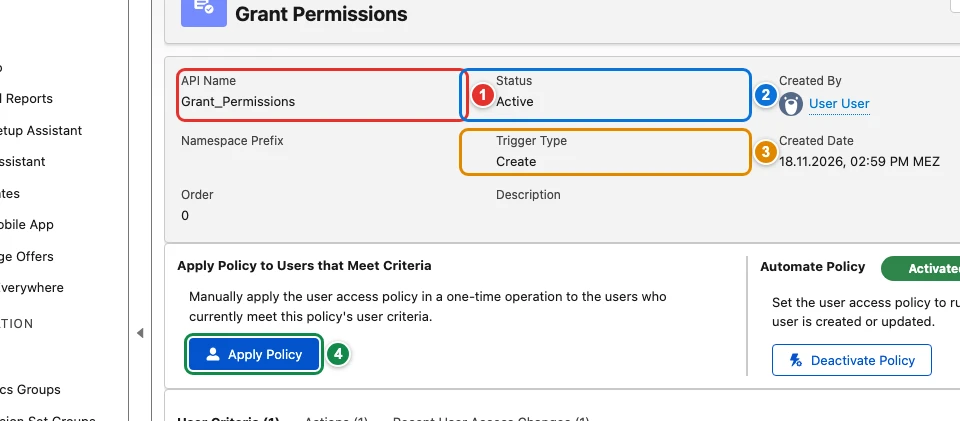
| Pill | Field |
|---|---|
| 1 | accessPolicies[0]. |
| 2 | accessPolicies[0]. |
| 3 | accessPolicies[0]. |
| 4 | accessPolicies[0]. |
Use cases
New administrators get their permission sets automatically
Every time Fourth Coffee hires a Salesforce administrator, someone forgets one of the permission sets they need. The team describes the rule in a user access policy, Grant_Permissions: users with the System Administrator profile get the admin permission sets. The policy is deployed with the rest of the metadata, but the Metadata API cannot switch it on: a policy deployed with the status Active is saved as Design, and no metadata runs it for the existing users.
This config automates the policy so that it runs whenever a matching user is created, and runs Apply Policy once ("Apply To All") for the administrators who already exist. Apply To All cannot be undone and runs again at every apply, so keep it out of the config once the existing users have their access.
{
  "$schema": "https://raw.githubusercontent.com/amtrack/sfdx-browserforce-plugin/main/src/plugins/schema.json",
  "settings": {
    "userAccessPolicies": {
      "accessPolicies": [
        {
          "apiName": "Grant_Permissions",
          "active": true,
          "on": "Create",
          "applyToAll": true
        }
      ]
    }
  }
}
Examples
{
  "$schema": "https://raw.githubusercontent.com/amtrack/sfdx-browserforce-plugin/main/src/plugins/schema.json",
  "settings": {
    "userAccessPolicies": {
      "accessPolicies": [
        {
          "apiName": "Grant_Permissions",
          "active": true,
          "on": "Create"
        }
      ]
    }
  }
}
{
  "$schema": "https://raw.githubusercontent.com/amtrack/sfdx-browserforce-plugin/main/src/plugins/schema.json",
  "settings": {
    "userAccessPolicies": {
      "accessPolicies": [
        {
          "apiName": "Grant_Permissions",
          "applyToAll": true
        }
      ]
    }
  }
}
Fields
In the field paths, [] stands for the items of a list and * for the entries of an object keyed by name.
| Field | Type | Description | Values |
|---|---|---|---|
accessPolicies[]. |
string | The API name of the user access policy (e.g., 'Grant_Permissions') Required. |
|
accessPolicies[]. |
boolean | Whether the policy should be active (true) or inactive (false). Leave it out to keep the current status of the policy. | |
accessPolicies[]. |
string | Optional: specify when to apply the policy - 'Create', 'Update', or 'CreateAndUpdate'. Only used when active is true. | CreateUpdateCreateAndUpdate |
accessPolicies[]. |
boolean | Apply To All Run Apply To All once the policy is set: assigns its access to every user matching its criteria. Runs Apply To All at each apply: Salesforce keeps no state that tells it already ran. A run cannot be undone. Irreversible: cannot be changed back once applied. |
JSON Schema
{
"type": "object",
"properties": {
"accessPolicies": {
"default": [],
"title": "Access Policies",
"description": "List of user access policies to activate, deactivate or apply to all users",
"type": "array",
"items": {
"type": "object",
"properties": {
"apiName": {
"type": "string",
"description": "The API name of the user access policy (e.g., 'Grant_Permissions')"
},
"active": {
"type": "boolean",
"description": "Whether the policy should be active (true) or inactive (false). Leave it out to keep the current status of the policy."
},
"on": {
"type": "string",
"enum": [
"Create",
"Update",
"CreateAndUpdate"
],
"description": "Optional: specify when to apply the policy - 'Create', 'Update', or 'CreateAndUpdate'. Only used when active is true."
},
"applyToAll": {
"type": "boolean",
"title": "Apply To All",
"x-irreversible": true,
"description": "Run Apply To All once the policy is set: assigns its access to every user matching its criteria. Runs Apply To All at each apply: Salesforce keeps no state that tells it already ran. A run cannot be undone."
}
},
"required": [
"apiName"
]
}
}
},
"title": "User Access Policies",
"description": "Setup: **Users → User Access Policies** (`/lightning/setup/UserAccessPolicies/home`)\n\nActivates or deactivates User Access Policies, chooses when they run (on create, update, or both), and runs Apply To All.\n\n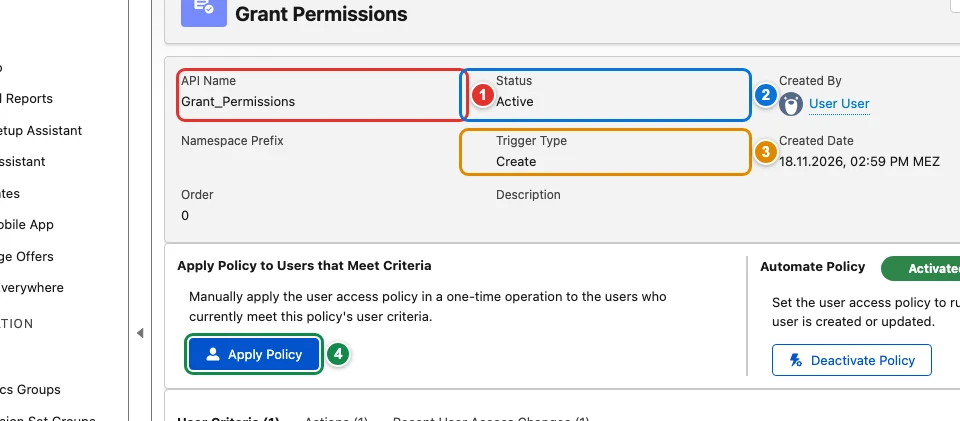",
"examples": [
{
"accessPolicies": [
{
"apiName": "Grant_Permissions",
"active": true,
"on": "Create"
}
]
},
{
"accessPolicies": [
{
"apiName": "Grant_Permissions",
"active": true,
"on": "Create",
"applyToAll": true
}
]
},
{
"accessPolicies": [
{
"apiName": "Grant_Permissions",
"applyToAll": true
}
]
}
],
"x-prerequisites": [
"User Access Policies enabled (User Management Settings)"
]
}