Picklists
Config key: settings.picklists
Changes picklist values in ways the Metadata API cannot:
- replace a value by another one in the records using it, then deactivate or delete the old value;
- activate or deactivate values;
- rename the API name of a value (
newApiName, and its label withnewLabel), active or inactive: Salesforce updates the records holding it, without field history nor automation. A deployment of a renamed value creates a new value instead, so rename it in your source too. The org must allow it (PicklistSettings.isPicklistApiNameEditDisabledfalse); - manage (create, modify, delete) the field dependencies of custom fields. An existing field dependency of the dependent field is deleted first.
Screenshots
Contract status
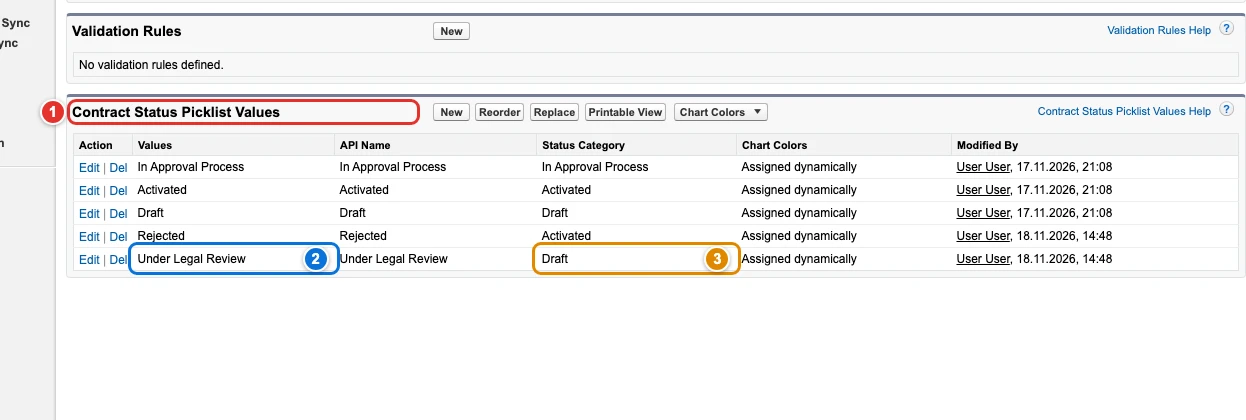
| Pill | Field |
|---|---|
| 1 | picklistValues[0]. |
| 2 | picklistValues[0]. |
| 3 | picklistValues[0]. |
Field dependencies
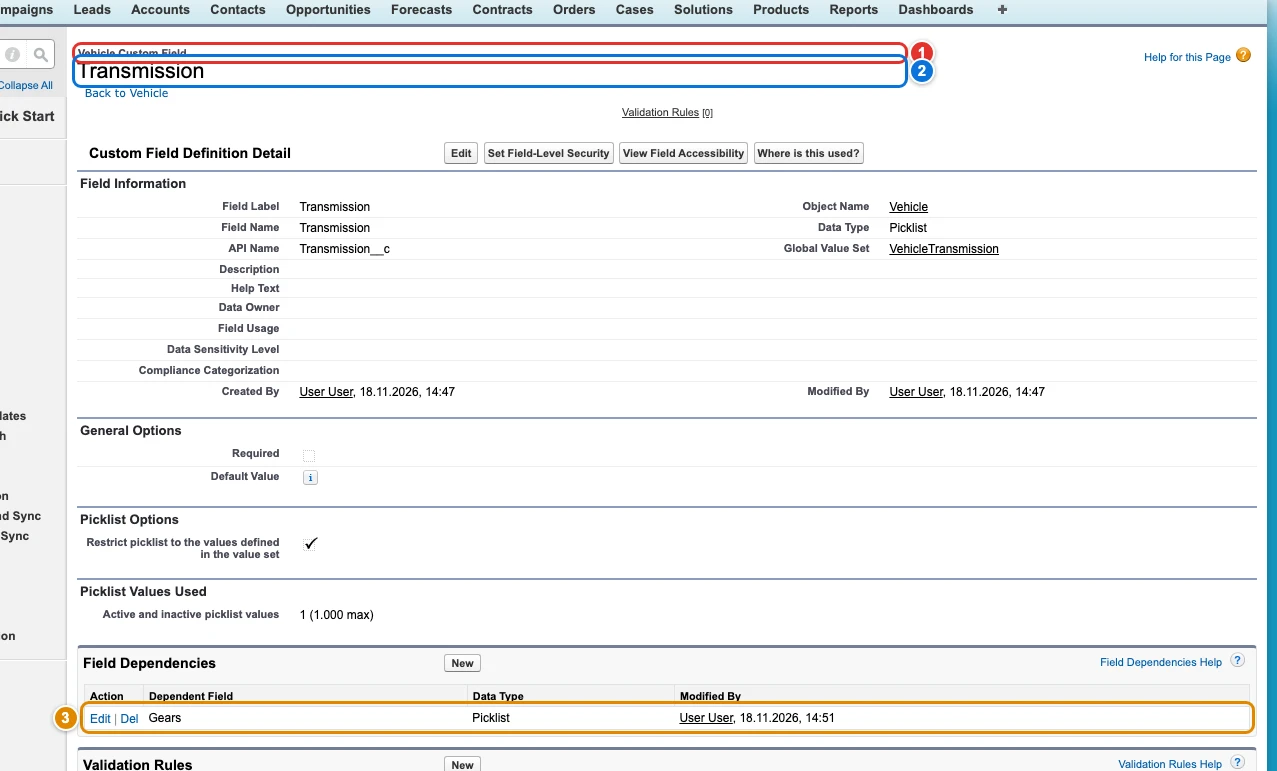
| Pill | Field |
|---|---|
| 1 | fieldDependencies[0]. |
| 2 | fieldDependencies[0]. |
| 3 | fieldDependencies[0]. |
Use cases
Rename the API name of a value, with the records that hold it
Acme connects a marketing automation tool that only accepts lead sources without spaces, and its Lead Source picklist has a value whose API name is Partner Referral. The sales reps must go on seeing the same label, and the thousands of existing leads must keep their source. Deploying the value set with a value renamed to Partner_Referral does not rename anything: the Metadata API creates a new value, and every lead keeps the old one. Only the Edit page of the value in Setup changes its API name in place, and Salesforce then updates the records that hold it.
With newApiName, Browserforce renames the API name to Partner_Referral and keeps the label. An inactive value has no Edit link: Browserforce activates it, renames it and deactivates it again. Once Partner_Referral exists, a second apply does nothing, and it fails before changing anything when another value already has the new API name or when the org forbids changing API names.
{
  "$schema": "https://raw.githubusercontent.com/amtrack/sfdx-browserforce-plugin/main/src/plugins/schema.json",
  "settings": {
    "picklists": {
      "picklistValues": [
        {
          "metadataType": "StandardValueSet",
          "metadataFullName": "LeadSource",
          "value": "Partner Referral",
          "newApiName": "Partner_Referral"
        }
      ]
    }
  }
}
Rename the API name and the label of a value
The dealer's new telematics partner sends the features of each car with its own codes, and expects Satnav where the Features field stores Navigation. The sales team takes the occasion to give the value a clearer label, and both changes must reach every org of the dealer, with the Vehicles that hold the value.
Next to newApiName, which renames the API name to Satnav in place as in the use case above, newLabel changes the label users see to Satellite Navigation in the same edit. With newLabel, a second apply also checks the label, and only changes it when it differs.
{
  "$schema": "https://raw.githubusercontent.com/amtrack/sfdx-browserforce-plugin/main/src/plugins/schema.json",
  "settings": {
    "picklists": {
      "picklistValues": [
        {
          "metadataType": "CustomField",
          "metadataFullName": "Vehicle__c.Features__c",
          "value": "Navigation",
          "newApiName": "Satnav",
          "newLabel": "Satellite Navigation"
        }
      ]
    }
  }
}
Add a contract status with its category
At Acme, every contract goes through the legal team before it is activated. The Contract Status picklist needs a step Under Legal Review, and each contract status belongs to a Status Category, Draft, Activated or Expired, which drives what users can do with the contract. The StandardValue type of the Metadata API has no field for the status category, so a deployment cannot create such a status.
Set statusCategory with newValue on a status picklist (contracts, orders): Browserforce creates the value on its Setup page and picks the category there. A second apply finds the value and does nothing.
{
  "$schema": "https://raw.githubusercontent.com/amtrack/sfdx-browserforce-plugin/main/src/plugins/schema.json",
  "settings": {
    "picklists": {
      "picklistValues": [
        {
          "metadataType": "StandardValueSet",
          "metadataFullName": "ContractStatus",
          "newValue": "Under Legal Review",
          "statusCategory": "Draft"
        }
      ]
    }
  }
}
Replace a value in the records, keeping the old one
The marketing team of Acme merged its call channels: the leads that came by phone, like Thandi Ndlovu's, now count under Other. The Replace button of a picklist page rewrites a value in every record that holds it; the Metadata API only deploys the list of values, and never touches the records.
This config replaces Phone Inquiry with Other in the Lead Source of every lead. Without active or absent, the old value stays in the picklist, active, for the processes that still read it. Replacing is not idempotent: every apply runs it again, which is harmless once no record holds the old value.
{
  "$schema": "https://raw.githubusercontent.com/amtrack/sfdx-browserforce-plugin/main/src/plugins/schema.json",
  "settings": {
    "picklists": {
      "picklistValues": [
        {
          "metadataType": "StandardValueSet",
          "metadataFullName": "LeadSource",
          "value": "Phone Inquiry",
          "newValue": "Other"
        }
      ]
    }
  }
}
Fill the blank values of the records
Acme imported a purchased list of prospects without filling their source, and its marketing reports now show a large "blank" slice. Records are data, not metadata: no deployment can fill an empty field, and only the Replace page of the picklist offers to replace the blanks.
With replaceAllBlankValues, the leads whose Lead Source is empty, like Bongani Dube's, get Purchased List. It is an alternative to value: one action replaces either a value or the blanks.
{
  "$schema": "https://raw.githubusercontent.com/amtrack/sfdx-browserforce-plugin/main/src/plugins/schema.json",
  "settings": {
    "picklists": {
      "picklistValues": [
        {
          "metadataType": "StandardValueSet",
          "metadataFullName": "LeadSource",
          "replaceAllBlankValues": true,
          "newValue": "Purchased List"
        }
      ]
    }
  }
}
Replace a value in the records, then deactivate it
The AUX input of old cars is now part of the media system. The admins of the dealer want every Vehicle that says AUX to say Media, and AUX to leave the choices, while the records keep a valid value. A deployment can deactivate a value, but it leaves the records with the old one: only the Replace page of Setup moves them.
Two actions on the same value run in order: the first replaces it in the records, the second sets active to false. The list of a config is applied from top to bottom.
{
  "$schema": "https://raw.githubusercontent.com/amtrack/sfdx-browserforce-plugin/main/src/plugins/schema.json",
  "settings": {
    "picklists": {
      "picklistValues": [
        {
          "metadataType": "CustomField",
          "metadataFullName": "Vehicle__c.Features__c",
          "value": "AUX",
          "newValue": "Media"
        },
        {
          "metadataType": "CustomField",
          "metadataFullName": "Vehicle__c.Features__c",
          "value": "AUX",
          "active": false
        }
      ]
    }
  }
}
Replace a value in the records, then delete it
Compact discs are gone for good, and the dealer wants the value out of the Features field, not only hidden. The Metadata API cannot delete a picklist value: a value missing from a deployment is only deactivated, and its records keep it. Deleting a value in Setup asks what the records that hold it become.
With absent: true and a newValue, Browserforce deletes CD and gives its records Media. Without newValue, their value is cleared.
{
  "$schema": "https://raw.githubusercontent.com/amtrack/sfdx-browserforce-plugin/main/src/plugins/schema.json",
  "settings": {
    "picklists": {
      "picklistValues": [
        {
          "metadataType": "CustomField",
          "metadataFullName": "Vehicle__c.Features__c",
          "value": "CD",
          "newValue": "Media",
          "absent": true
        }
      ]
    }
  }
}
Remove a field dependency
A field dependency also gets in the way: an import of old Vehicle records fails on every gear that does not match its transmission. The dealer removes the dependency during the migration. The Metadata API can create or change a field dependency, but deploying the field without its controlling field does not remove it.
Set the controlling field of Gears on Vehicle to null: Browserforce deletes the dependency, which leaves the field dependencies of Transmission, and every value of Gears is available again. A second apply finds no dependency and does nothing.
{
  "$schema": "https://raw.githubusercontent.com/amtrack/sfdx-browserforce-plugin/main/src/plugins/schema.json",
  "settings": {
    "picklists": {
      "fieldDependencies": [
        {
          "object": "Vehicle__c",
          "dependentField": "Gears__c",
          "controllingField": null
        }
      ]
    }
  }
}
Examples
{
  "$schema": "https://raw.githubusercontent.com/amtrack/sfdx-browserforce-plugin/main/src/plugins/schema.json",
  "settings": {
    "picklists": {
      "picklistValues": [
        {
          "metadataType": "StandardValueSet",
          "metadataFullName": "LeadSource",
          "value": "Purchased List",
          "newValue": "Other",
          "absent": true
        }
      ]
    }
  }
}
{
  "$schema": "https://raw.githubusercontent.com/amtrack/sfdx-browserforce-plugin/main/src/plugins/schema.json",
  "settings": {
    "picklists": {
      "picklistValues": [
        {
          "metadataType": "CustomField",
          "metadataFullName": "Account.MyPicklist__c",
          "value": "MyOldValue",
          "active": false
        }
      ]
    }
  }
}
Fields
In the field paths, [] stands for the items of a list and * for the entries of an object keyed by name.
| Field | Type | Description | Values |
|---|---|---|---|
picklistValues[]. |
string | the metadata type Required. |
CustomFieldGlobalValueSetStandardValueSet |
picklistValues[]. |
string | the API name of the CustomField/GlobalValueSet/StandardValueSet Required. |
|
picklistValues[]. |
string | the API name of the value | |
picklistValues[]. |
string | the API name of the new value, otherwise blank | |
picklistValues[]. |
string | the Status Category of a new picklist value | |
picklistValues[]. |
boolean | replace all blank values (mutually exclusive to replacing an old value) | |
picklistValues[]. |
boolean | ensure the picklist value is active/inactive | |
picklistValues[]. |
boolean | ensure the picklist value is absent/deleted | |
picklistValues[]. |
string | rename the API name of the value: the records holding it follow | |
picklistValues[]. |
string | with newApiName: the new label of the renamed value | |
fieldDependencies[]. |
string | the API name of the CustomObject | |
fieldDependencies[]. |
string | the API name of the CustomField that has its values filtered | |
fieldDependencies[]. |
json | the API name of the CustomField that drives filtering If this value is null or not set, the Field Dependency will be deleted. |
JSON Schema
{
"type": "object",
"properties": {
"picklistValues": {
"default": [],
"title": "Picklist Values",
"description": "Replace (and delete) picklist values",
"type": "array",
"items": {
"type": "object",
"properties": {
"metadataType": {
"type": "string",
"enum": [
"CustomField",
"GlobalValueSet",
"StandardValueSet"
],
"description": "the metadata type"
},
"metadataFullName": {
"type": "string",
"description": "the API name of the CustomField/GlobalValueSet/StandardValueSet"
},
"value": {
"type": "string",
"description": "the API name of the value"
},
"newValue": {
"type": "string",
"description": "the API name of the new value, otherwise blank"
},
"statusCategory": {
"type": "string",
"description": "the Status Category of a new picklist value"
},
"replaceAllBlankValues": {
"type": "boolean",
"description": "replace all blank values (mutually exclusive to replacing an old value)"
},
"active": {
"type": "boolean",
"description": "ensure the picklist value is active/inactive"
},
"absent": {
"type": "boolean",
"description": "ensure the picklist value is absent/deleted"
},
"newApiName": {
"type": "string",
"minLength": 1,
"description": "rename the API name of the value: the records holding it follow"
},
"newLabel": {
"type": "string",
"minLength": 1,
"description": "with newApiName: the new label of the renamed value"
}
},
"required": [
"metadataType",
"metadataFullName"
]
}
},
"fieldDependencies": {
"default": [],
"description": "Manage (create/modify/delete) Field Dependencies on CustomFields.\nIf a Field Dependency already exists for the dependent field, it will be deleted.",
"title": "Field Dependencies",
"type": "array",
"items": {
"type": "object",
"properties": {
"object": {
"type": "string",
"title": "the API name of the CustomObject",
"examples": [
"Account",
"Vehicle__c",
"ACME__Vehicle__c"
]
},
"dependentField": {
"type": "string",
"title": "the API name of the CustomField that has its values filtered",
"examples": [
"Gears__c",
"ACME__Gears__c"
]
},
"controllingField": {
"title": "the API name of the CustomField that drives filtering",
"description": "If this value is null or not set, the Field Dependency will be deleted.",
"examples": [
"Transmission__c",
"ACME__Transmission__c",
null
],
"type": [
"string",
"null"
]
}
}
}
}
},
"title": "Picklists",
"description": "Changes picklist values in ways the Metadata API cannot:\n\n- replace a value by another one in the records using it, then deactivate or delete the old value;\n- activate or deactivate values;\n- rename the API name of a value (`newApiName`, and its label with `newLabel`), active or inactive: Salesforce updates the records holding it, without field history nor automation. A deployment of a renamed value creates a new value instead, so rename it in your source too. The org must allow it (`PicklistSettings.isPicklistApiNameEditDisabled` false);\n- manage (create, modify, delete) the field dependencies of custom fields. An existing field dependency of the dependent field is deleted first.\n\n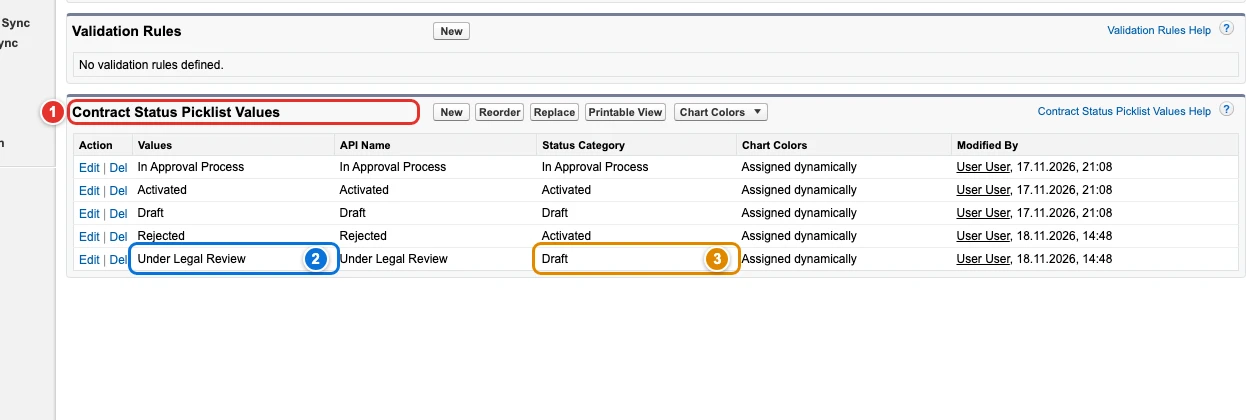",
"examples": [
{
"picklistValues": [
{
"metadataType": "StandardValueSet",
"metadataFullName": "LeadSource",
"value": "Phone Inquiry",
"newValue": "Other"
}
]
},
{
"picklistValues": [
{
"metadataType": "StandardValueSet",
"metadataFullName": "LeadSource",
"value": "Purchased List",
"newValue": "Other",
"absent": true
}
]
},
{
"picklistValues": [
{
"metadataType": "CustomField",
"metadataFullName": "Account.MyPicklist__c",
"value": "MyOldValue",
"active": false
}
]
},
{
"picklistValues": [
{
"metadataType": "StandardValueSet",
"metadataFullName": "LeadSource",
"value": "Partner Referral",
"newApiName": "Partner_Referral"
}
]
}
]
}