Installation
sf plugins install sfdx-browserforce-plugin
Playwright does not come with a browser automatically
You might need to install a browser explicitly or configure Browserforce to use an existing browser.
GitHub Actions
If you're using Browserforce on GitHub Actions with the ubuntu-latest (v24) image, the preinstalled Google Chrome is used automatically.
No further configuration and installation needed, because the CHROME_BIN environment variable is already set.
Option 1: Install a browser using our Playwright wrapper command
sf browserforce playwright -- install chromium
Important
The two hyphens -- are intentional and separate the sf command from the arguments to be passed to the playwright executable.
Option 2: Configure Browserforce to use an existing browser
You can use any of the following environment variables:
BROWSERFORCE_BROWSER_CHANNEL="chrome"
BROWSERFORCE_BROWSER_CHANNEL="chromium"
BROWSERFORCE_BROWSER_EXECUTABLE_PATH="/usr/bin/google-chrome"
CHROME_BIN="/usr/bin/google-chrome"
Alternative installation without sf
You can also install the sfdx-browserforce-plugin npm package without sf. The package exports a sfdx-browserforce-plugin executable:
npm install --save-dev sfdx-browserforce-plugin
npx sfdx-browserforce-plugin browserforce -h
Using sfdx-hardis deployment actions
In a Salesforce CI/CD pipeline run by sfdx-hardis, a Browser deployment action applies a Browserforce setting to each org a Pull Request is deployed to, before or after the deployment. There is nothing to install: sfdx-hardis installs Browserforce when it is missing, and its Docker images include Browserforce and its browser.
In the sfdx-hardis VS Code extension, pick the setting in the list: its fields show as a form, filled with the example of the setting, with its warnings. Check with Browserforce validates the value before saving. During a deployment check, nothing is changed: the Pull Request comment shows what the deployment will change.
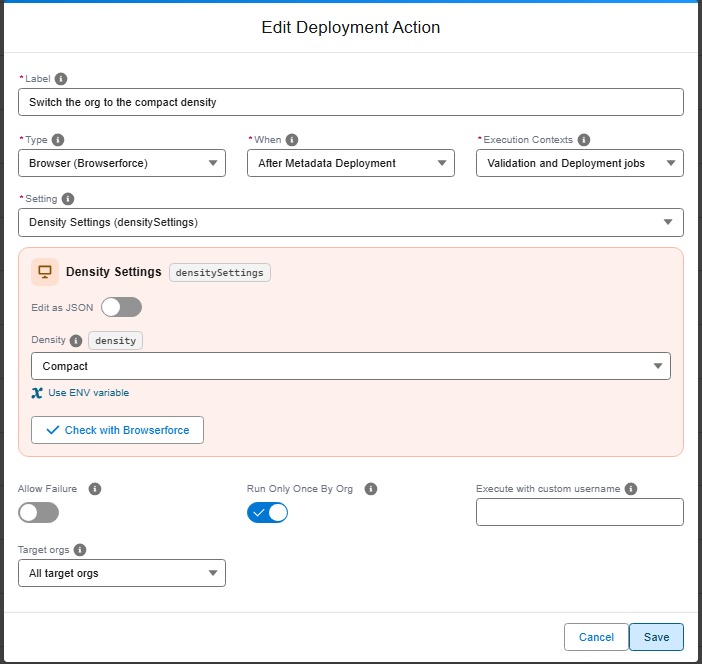
commandsPostDeploy:
  - id: 2f0c4d1e-7a3b-4c5d-9e8f-0a1b2c3d4e5f
    label: Switch the org to the compact density
    type: browser
    context: all
    parameters:
      setting: densitySettings
      config:
        density: Compact
Values written as "${VARIABLE}" are read from CI/CD variables, so secrets stay out of git. See Apply a Setup setting in a browser in the sfdx-hardis documentation.
The same Browserforce setting can also be an org initialization step, so that each new scratch org or sandbox is set up the same way:
orgInitSteps:
  - id: compact-density
    label: Compact density for all users
    type: browser
    parameters:
      setting: densitySettings
      config:
        density: Compact