Customer Portal Settings
Config key: settings.customerPortal
Salesforce Classic only
This feature only exists in Salesforce Classic.
Irreversible
Once applied, enabled cannot be changed back.
Salesforce Classic Setup: Customize → Customer Portal → Customer Portal Settings (/_ui/core/portal/CustomerSuccessPortalSetup/e)
Enables the Customer Portal, configures its portals (self-registration, profiles) and the custom objects available in it.
Screenshots
Customer portal setup
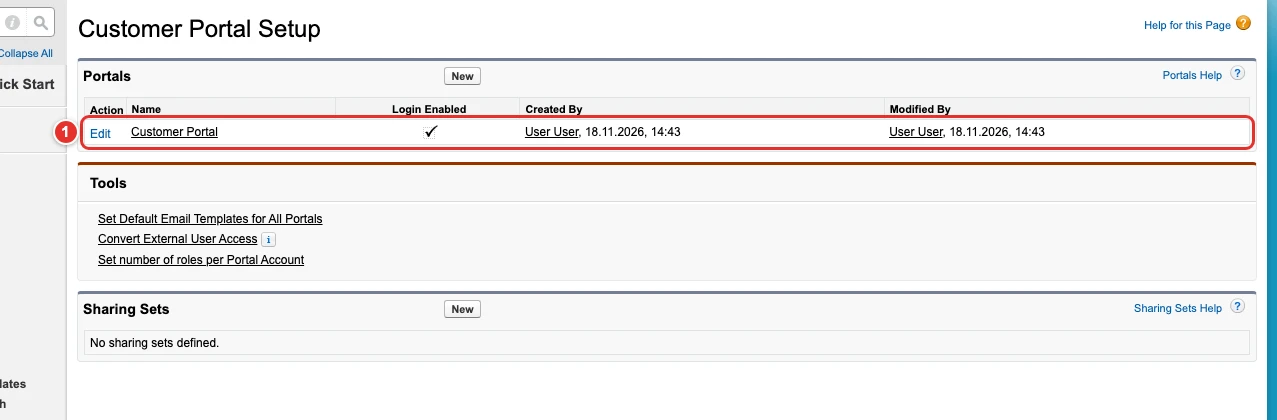
| Pill | Field |
|---|---|
| 1 | enabled |
Profiles of the portal
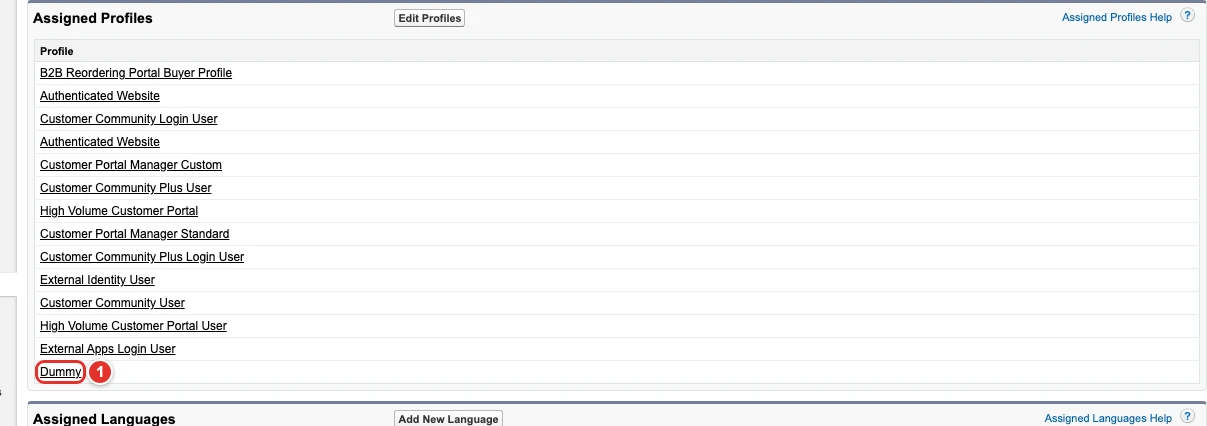
| Pill | Field |
|---|---|
| 1 | portals[0]. |
Portals
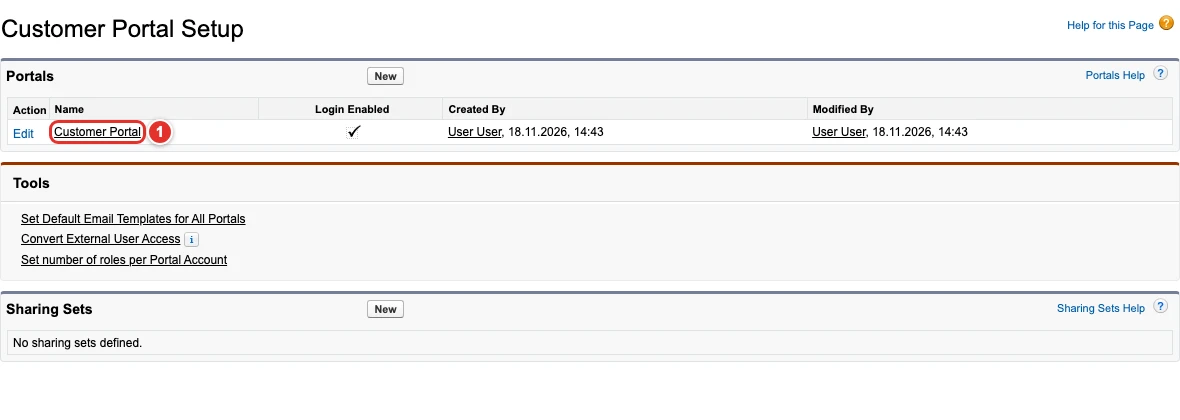
| Pill | Field |
|---|---|
| 1 | portals[0]. |
The custom object Dummy__c
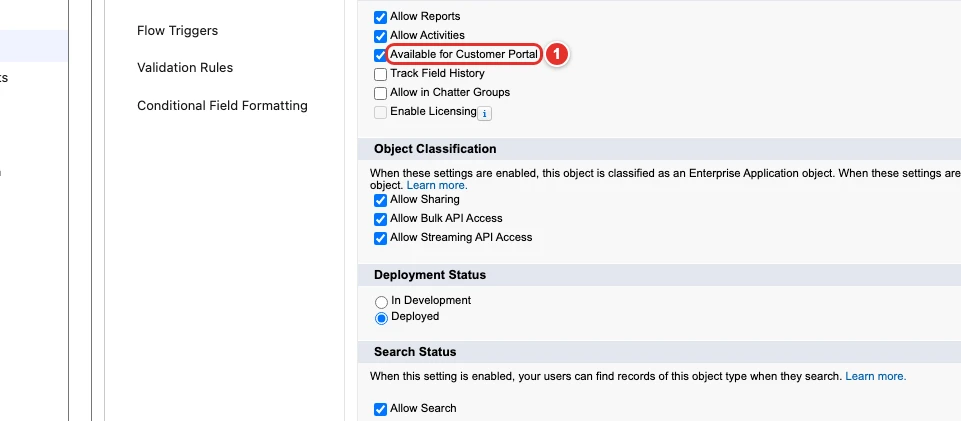
| Pill | Field |
|---|---|
| 1 | availableCustomObjects[0]. |
The Quote object of Salesforce CPQ (SBQQ__Quote__c)
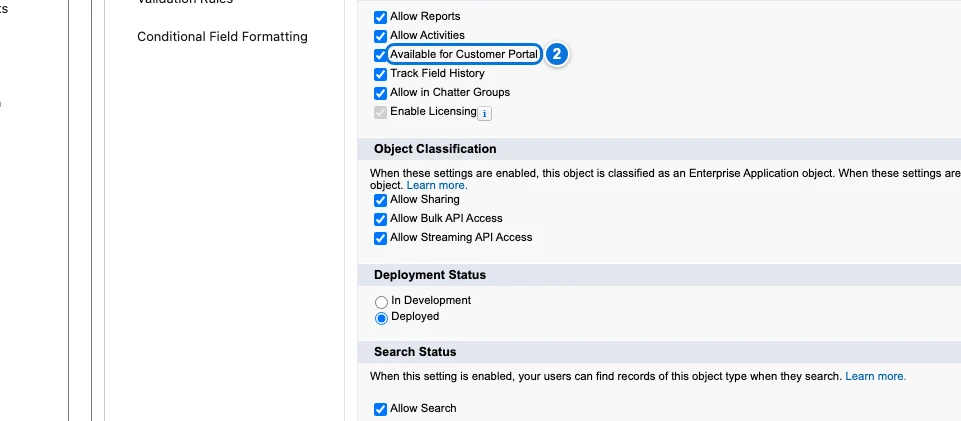
| Pill | Field |
|---|---|
| 2 | availableCustomObjects[1]. |
Use cases
Enable the Customer Portal with its default portal
Acme still serves its older customers through a Salesforce Classic Customer Portal, and every new sandbox or scratch org of its developers needs it. The Metadata API can turn on OrgSettings.enableCustomerSuccessPortal, but only Setup also creates the portal named Customer Portal, with the current user as its administrator and email sender, which the next use cases configure.
This config ticks Enable Customer Portal. It cannot be turned off afterwards, so Browserforce only ever enables it.
{
  "$schema": "https://raw.githubusercontent.com/amtrack/sfdx-browserforce-plugin/main/src/plugins/schema.json",
  "settings": {
    "customerPortal": {
      "enabled": true
    }
  }
}
Choose the profiles of the portal and its self-registration
Acme's distributors log in to the Customer Portal with their own profile, Dummy in this org, and must be able to register themselves. Which profiles may use a portal is set on the Customer Portal Profiles page of the portal: the Profile and Portal types of the Metadata API have no field for it.
This config makes the profile Dummy one of the assigned profiles of the portal named Customer Portal, and sets its self-registration defaults. Profiles that portalProfileMemberships does not list keep their setting.
{
  "$schema": "https://raw.githubusercontent.com/amtrack/sfdx-browserforce-plugin/main/src/plugins/schema.json",
  "settings": {
    "customerPortal": {
      "enabled": true,
      "portals": [
        {
          "name": "Customer Portal",
          "adminUser": "User User",
          "description": "Customer Portal",
          "isSelfRegistrationActivated": true,
          "selfRegUserDefaultLicense": "Customer Portal Manager Custom",
          "selfRegUserDefaultRole": "User",
          "selfRegUserDefaultProfile": "Customer Portal Manager Custom",
          "portalProfileMemberships": [
            {
              "name": "Dummy",
              "active": true
            }
          ]
        }
      ]
    }
  }
}
Rename the portal
The portal created by Setup is named Customer Portal, and Acme wants its customers to see Acme Support in the emails and pages of the portal. The Portal type of the Metadata API identifies a portal by its name, so a deployment cannot rename it: it would look for a portal of the new name.
oldName finds the portal, and name is its new name. Once renamed, a second apply finds no portal named Customer Portal but one named Acme Support, and does nothing.
{
  "$schema": "https://raw.githubusercontent.com/amtrack/sfdx-browserforce-plugin/main/src/plugins/schema.json",
  "settings": {
    "customerPortal": {
      "enabled": true,
      "portals": [
        {
          "name": "Acme Support",
          "oldName": "Customer Portal"
        }
      ]
    }
  }
}
Make custom objects available in the portal
Acme's customers must see their Dummy records and their Salesforce CPQ quotes in the portal. A custom object only appears in a Customer Portal once Available for Customer Portal is ticked in the definition of the object, an option of its Setup page.
This config ticks it for Dummy__c and for the SBQQ__Quote__c object of Salesforce CPQ: an object is named by its API name without suffix, with its namespacePrefix when it comes from a managed package. available: false removes an object from the portal.
{
  "$schema": "https://raw.githubusercontent.com/amtrack/sfdx-browserforce-plugin/main/src/plugins/schema.json",
  "settings": {
    "customerPortal": {
      "enabled": true,
      "availableCustomObjects": [
        {
          "name": "Dummy",
          "available": true
        },
        {
          "name": "Quote",
          "namespacePrefix": "SBQQ",
          "available": true
        }
      ]
    }
  }
}
Examples
{
  "$schema": "https://raw.githubusercontent.com/amtrack/sfdx-browserforce-plugin/main/src/plugins/schema.json",
  "settings": {
    "customerPortal": {
      "portals": [
        {
          "name": "Customer Portal",
          "isSelfRegistrationActivated": true
        }
      ]
    }
  }
}
{
  "$schema": "https://raw.githubusercontent.com/amtrack/sfdx-browserforce-plugin/main/src/plugins/schema.json",
  "settings": {
    "customerPortal": {
      "availableCustomObjects": [
        {
          "name": "MyObject",
          "available": true
        }
      ]
    }
  }
}
Fields
In the field paths, [] stands for the items of a list and * for the entries of an object keyed by name.
| Field | Type | Description | Default |
|---|---|---|---|
enabled |
boolean | Enable Customer Portal Although the Metadata API has a OrgSettings.enableCustomerSuccessPortal field, enabling this via the browser can be handy because it automatically creates a Portal named 'Customer Portal', where the admin and emailSenderAddress are set to the current user. Warning: cannot be disabled once enabled Irreversible: cannot be changed back once applied. |
|
portals[]. |
string | ||
portals[]. |
string | ||
portals[]. |
boolean | ||
portals[]. |
string | Required. | |
portals[]. |
string | ||
portals[]. |
string | ||
portals[]. |
string | ||
portals[]. |
string | ||
portals[]. |
json | Profiles for which this portal should be activated or deactivated | [] |
availableCustomObjects[]. |
string | Required. | |
availableCustomObjects[]. |
string | ||
availableCustomObjects[]. |
boolean | Required. |
JSON Schema
{
"type": "object",
"properties": {
"enabled": {
"type": "boolean",
"title": "Enable Customer Portal",
"x-irreversible": true,
"description": "Although the Metadata API has a OrgSettings.enableCustomerSuccessPortal field, enabling this via the browser can be handy because it automatically creates a Portal named 'Customer Portal', where the admin and emailSenderAddress are set to the current user. Warning: cannot be disabled once enabled"
},
"portals": {
"default": [],
"title": "Portals",
"type": "array",
"items": {
"type": "object",
"properties": {
"adminUser": {
"type": "string"
},
"description": {
"type": "string"
},
"isSelfRegistrationActivated": {
"type": "boolean"
},
"name": {
"type": "string"
},
"oldName": {
"type": "string"
},
"selfRegUserDefaultLicense": {
"type": "string"
},
"selfRegUserDefaultProfile": {
"type": "string"
},
"selfRegUserDefaultRole": {
"type": "string"
},
"portalProfileMemberships": {
"default": [],
"description": "Profiles for which this portal should be activated or deactivated",
"type": "array",
"items": {
"type": "object",
"properties": {
"name": {
"type": "string"
},
"active": {
"type": "boolean"
}
}
}
}
},
"required": [
"name"
]
}
},
"availableCustomObjects": {
"default": [],
"title": "Custom Objects available for Customer Portal",
"type": "array",
"items": {
"type": "object",
"properties": {
"name": {
"type": "string"
},
"namespacePrefix": {
"type": "string"
},
"available": {
"type": "boolean"
}
},
"required": [
"name",
"available"
]
}
}
},
"title": "Customer Portal Settings",
"description": "Salesforce Classic Setup: **Customize → Customer Portal → Customer Portal Settings** (`/_ui/core/portal/CustomerSuccessPortalSetup/e`)\n\nEnables the Customer Portal, configures its portals (self-registration, profiles) and the custom objects available in it.\n\n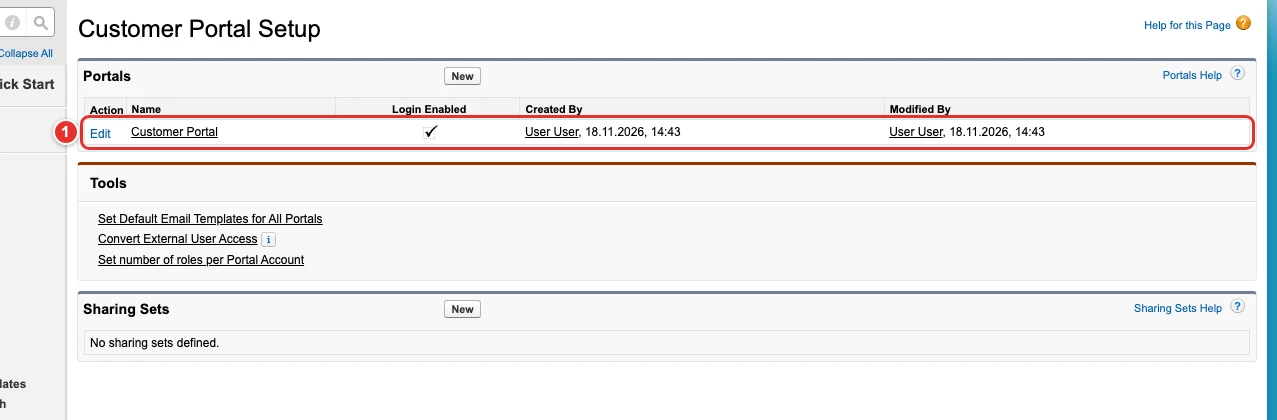",
"examples": [
{
"enabled": true
},
{
"portals": [
{
"name": "Customer Portal",
"isSelfRegistrationActivated": true
}
]
},
{
"availableCustomObjects": [
{
"name": "MyObject",
"available": true
}
]
}
],
"x-user-interface": "classic"
}