Security Controls
Config key: settings.security
Certificate and Key Management: Setup Security → Certificate and Key Management (/lightning/setup/CertificatesAndKeysManagement/home). Imports certificates from a Java Keystore (JKS) and creates self-signed certificates.
Authentication Configuration: Setup Company Settings → My Domain (/lightning/setup/OrgDomain/home). Toggles the authentication services of the Authentication Configuration section.
Screenshots
Authentication configuration
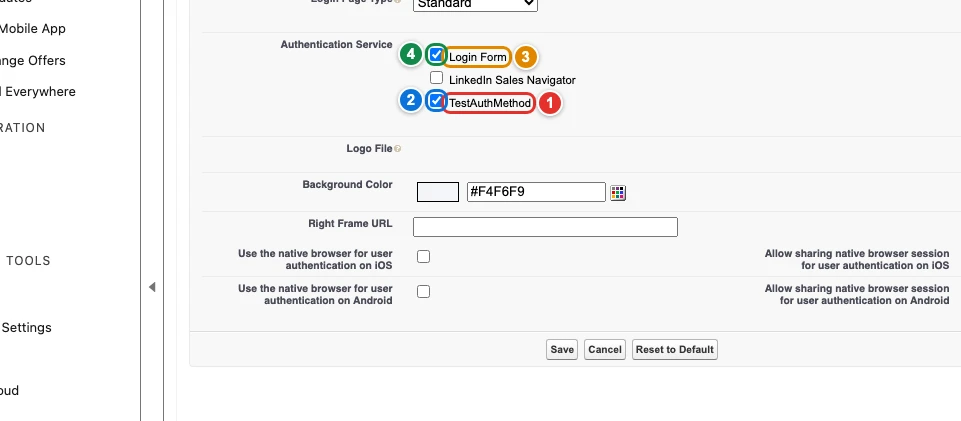
| Pill | Field |
|---|---|
| 1 | authenticationConfiguration. |
| 2 | authenticationConfiguration. |
| 3 | authenticationConfiguration. |
| 4 | authenticationConfiguration. |
Certificates
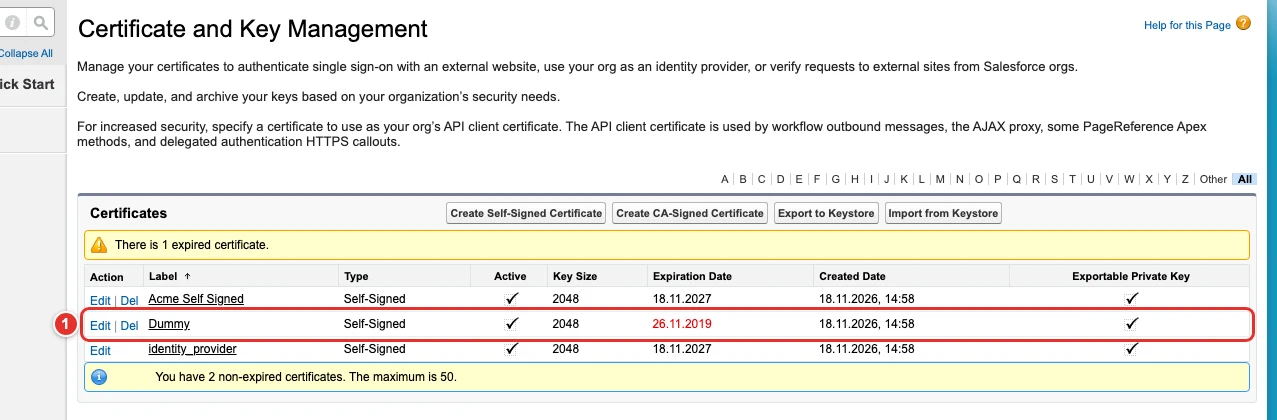
| Pill | Field |
|---|---|
| 1 | certificateAndKeyManagement. |
Use cases
Import a certificate and its private key from a keystore
Acme signs the SAML assertions of its identity provider with a certificate issued by its own certificate authority, and the same certificate and private key must exist in every org that acts as identity provider. Salesforce does not let any API import a private key: the only way in is the Import from Keystore button of Certificate and Key Management, which uploads a Java keystore (JKS).
This config uploads the keystore file at filePath, relative to the folder where apply runs, and the certificate appears as Dummy, the name Salesforce gives it from the keystore alias (in lowercase unless name changes its case). The same config can create self-signed certificates with certificates, although the Metadata API can do that too. The org must act as an identity provider first.
{
  "$schema": "https://raw.githubusercontent.com/amtrack/sfdx-browserforce-plugin/main/src/plugins/schema.json",
  "settings": {
    "security": {
      "certificateAndKeyManagement": {
        "importFromKeystore": [
          {
            "name": "Dummy",
            "filePath": "./src/plugins/security/certificate-and-key-management/Dummy.jks",
            "password": ""
          }
        ],
        "certificates": [
          {
            "name": "AcmeSelfSigned",
            "label": "Acme Self Signed",
            "keysize": 2048,
            "exportable": true
          }
        ]
      }
    }
  }
}
Offer single sign-on on the login page of My Domain
Acme's employees log in to Salesforce through the company's identity provider, set up as an Auth. Provider, while a few administrators keep a password as a fallback. The buttons of the My Domain login page come from its Authentication Configuration section, which no Metadata API setting holds: after each deployment of the Auth. Provider, an admin had to tick it there.
This config ticks the Auth. Provider TestAuthMethod, named by its API name with authProviderApiName, and keeps the Login Form ticked, named by the label Setup shows with label. Services the config does not list stay as they are.
{
  "$schema": "https://raw.githubusercontent.com/amtrack/sfdx-browserforce-plugin/main/src/plugins/schema.json",
  "settings": {
    "security": {
      "authenticationConfiguration": {
        "services": [
          {
            "authProviderApiName": "TestAuthMethod",
            "enabled": true
          },
          {
            "label": "Login Form",
            "enabled": true
          }
        ]
      }
    }
  }
}
Examples
{
  "$schema": "https://raw.githubusercontent.com/amtrack/sfdx-browserforce-plugin/main/src/plugins/schema.json",
  "settings": {
    "security": {
      "certificateAndKeyManagement": {
        "certificates": [
          {
            "name": "MySelfSignedCert",
            "label": "My Self Signed Cert",
            "keysize": 2048,
            "exportable": true
          }
        ]
      }
    }
  }
}
{
  "$schema": "https://raw.githubusercontent.com/amtrack/sfdx-browserforce-plugin/main/src/plugins/schema.json",
  "settings": {
    "security": {
      "certificateAndKeyManagement": {
        "importFromKeystore": [
          {
            "name": "MyCert",
            "filePath": "certs/keystore.jks",
            "password": "${KEYSTORE_PASSWORD}"
          }
        ]
      }
    }
  }
}
Fields
In the field paths, [] stands for the items of a list and * for the entries of an object keyed by name.
| Field | Type | Description |
|---|---|---|
certificateAndKeyManagement. |
string | Required. |
certificateAndKeyManagement. |
string | Required. |
certificateAndKeyManagement. |
boolean | |
certificateAndKeyManagement. |
integer | |
certificateAndKeyManagement. |
string | Optional new name of the certificate. WARNING: Only use this to change the case of the certificate name as the imported name is lowercase by default. Required. |
certificateAndKeyManagement. |
string | Relative path from current working directory Required. |
certificateAndKeyManagement. |
string | Secret: masked in the output of apply. |
authenticationConfiguration. |
string | The visible name of the authentication service |
authenticationConfiguration. |
string | The DeveloperName of the AuthProvider (alternative to label for matching) |
authenticationConfiguration. |
boolean | True to enable, false to disable |
JSON Schema
{
"type": "object",
"properties": {
"certificateAndKeyManagement": {
"type": "object",
"properties": {
"certificates": {
"default": [],
"title": "Self-Signed Certificates",
"type": "array",
"items": {
"type": "object",
"properties": {
"name": {
"type": "string"
},
"label": {
"type": "string"
},
"exportable": {
"type": "boolean"
},
"keysize": {
"type": "integer",
"minimum": -9007199254740991,
"maximum": 9007199254740991
}
},
"required": [
"name",
"label"
]
}
},
"importFromKeystore": {
"default": [],
"title": "Import Certificate from Keystore",
"type": "array",
"items": {
"type": "object",
"properties": {
"name": {
"type": "string",
"description": "Optional new name of the certificate. WARNING: Only use this to change the case of the certificate name as the imported name is lowercase by default."
},
"filePath": {
"type": "string",
"description": "Relative path from current working directory"
},
"password": {
"type": "string",
"x-password": true
}
},
"required": [
"name",
"filePath"
]
}
}
},
"title": "Certificate and Key Management"
},
"authenticationConfiguration": {
"type": "object",
"properties": {
"services": {
"type": "array",
"items": {
"type": "object",
"properties": {
"label": {
"type": "string",
"description": "The visible name of the authentication service"
},
"authProviderApiName": {
"type": "string",
"description": "The DeveloperName of the AuthProvider (alternative to label for matching)"
},
"enabled": {
"type": "boolean",
"description": "True to enable, false to disable"
}
},
"oneOf": [
{
"required": [
"label",
"enabled"
]
},
{
"required": [
"authProviderApiName",
"enabled"
]
},
{
"required": [
"label",
"authProviderApiName",
"enabled"
]
}
]
},
"description": "List of Authentication Services to configure under My Domain, each with desired enabled state",
"default": []
}
},
"required": [
"services"
],
"title": "Authentication Configuration"
}
},
"title": "Security Controls",
"description": "**Certificate and Key Management**: Setup **Security → Certificate and Key Management** (`/lightning/setup/CertificatesAndKeysManagement/home`). Imports certificates from a Java Keystore (JKS) and creates self-signed certificates.\n\n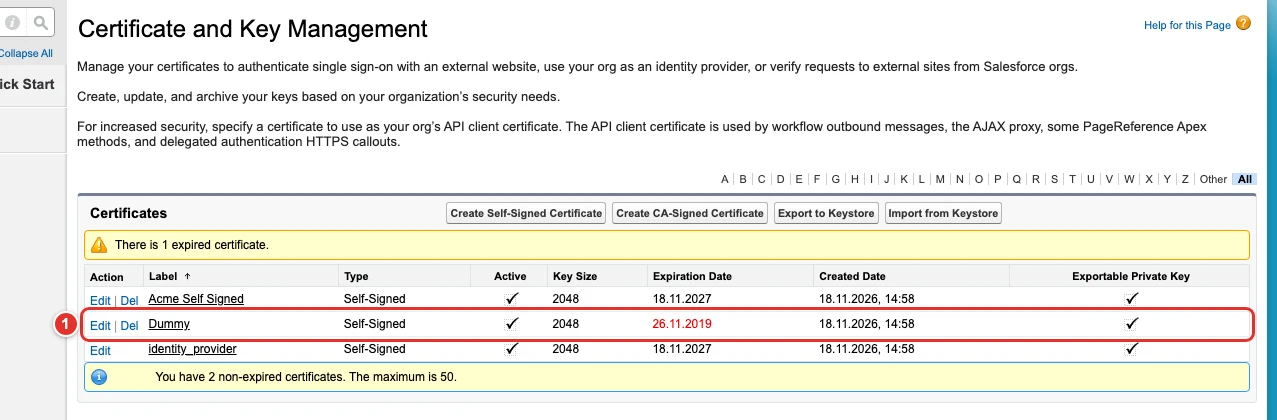\n\n**Authentication Configuration**: Setup **Company Settings → My Domain** (`/lightning/setup/OrgDomain/home`). Toggles the authentication services of the Authentication Configuration section.\n\n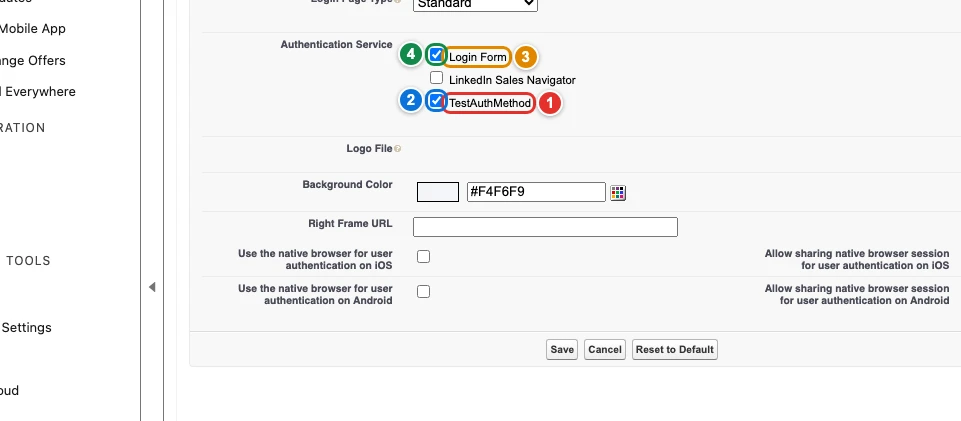",
"examples": [
{
"certificateAndKeyManagement": {
"certificates": [
{
"name": "MySelfSignedCert",
"label": "My Self Signed Cert",
"keysize": 2048,
"exportable": true
}
]
}
},
{
"certificateAndKeyManagement": {
"importFromKeystore": [
{
"name": "MyCert",
"filePath": "certs/keystore.jks",
"password": "${KEYSTORE_PASSWORD}"
}
]
}
}
]
}