Auth Providers
Config key: settings.authProviders
Setup: Identity → Auth. Providers (/lightning/setup/AuthProviders/home)
Updates the Consumer Key and the Consumer Secret of existing Auth Providers, keyed by their API name. Reference the secret with an environment variable ("${MY_SECRET}") rather than writing it in the config file: it is masked in the output of apply.
Screenshot
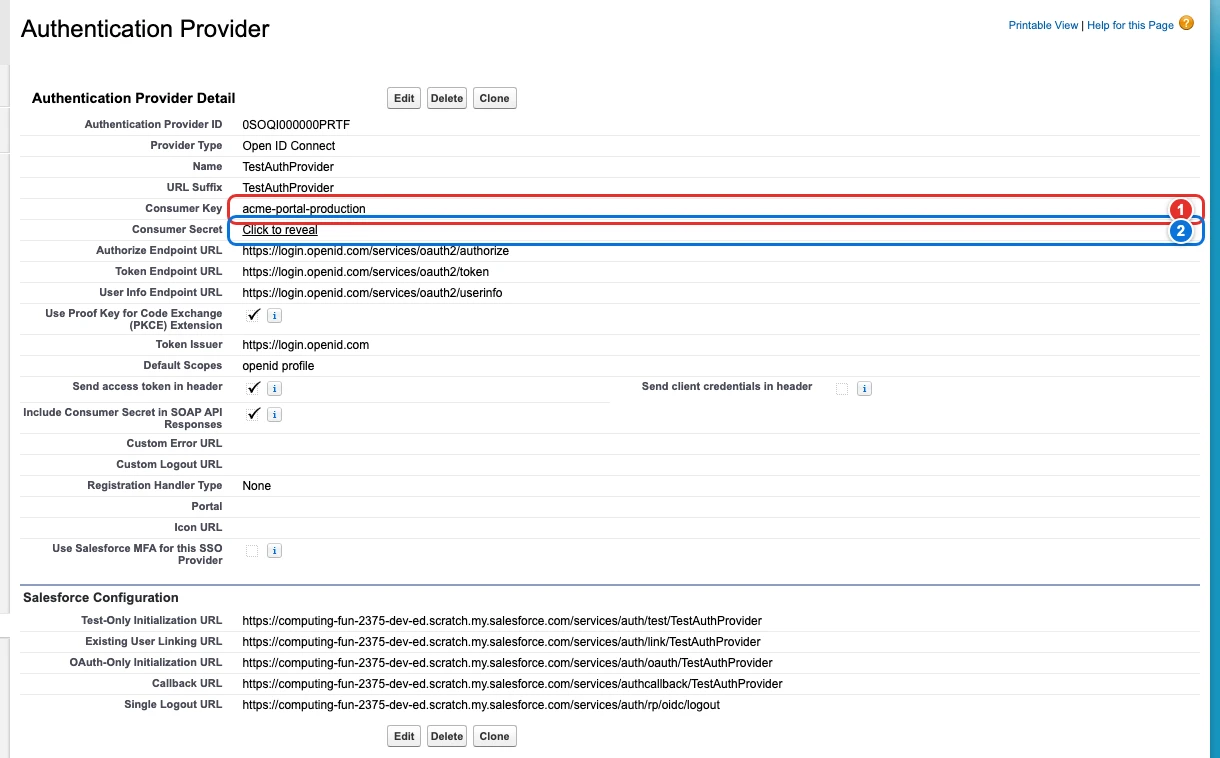
| Pill | Field |
|---|---|
| 1 | TestAuthProvider. |
| 2 | TestAuthProvider. |
Use cases
Set the credentials of a single sign-on provider in each environment
Acme's partners log in to its community with their own OpenID Connect identity provider. The Auth. Provider is deployed with the Metadata API, but each environment talks to a different client of the identity provider, and the Metadata API only exports the consumer secret as a placeholder and only deploys a value encrypted by the org itself: the real secret has to be typed in Setup in each environment.
This config sets the Consumer Key and the Consumer Secret of the Auth. Provider named TestAuthProvider (its API name, the key of the entry). The secret comes from the environment variable PARTNER_SSO_SECRET of the pipeline, never from the file, and apply masks it in its output. Setup never shows a secret back, so Browserforce cannot compare it: every apply writes both values again.
{
  "$schema": "https://raw.githubusercontent.com/amtrack/sfdx-browserforce-plugin/main/src/plugins/schema.json",
  "settings": {
    "authProviders": {
      "TestAuthProvider": {
        "consumerKey": "acme-portal-production",
        "consumerSecret": "${PARTNER_SSO_SECRET}"
      }
    }
  }
}
Example
{
  "$schema": "https://raw.githubusercontent.com/amtrack/sfdx-browserforce-plugin/main/src/plugins/schema.json",
  "settings": {
    "authProviders": {
      "MyAuthProvider": {
        "consumerKey": "my-consumer-key",
        "consumerSecret": "${MY_AUTH_PROVIDER_SECRET}"
      }
    }
  }
}
Fields
In the field paths, [] stands for the items of a list and * for the entries of an object keyed by name.
| Field | Type | Description |
|---|---|---|
*. |
string | Consumer Secret The Consumer Secret value for the Auth Provider Secret: masked in the output of apply. |
*. |
string | Consumer Key The Consumer Key value for the Auth Provider |
JSON Schema
{
"type": "object",
"propertyNames": {
"type": "string",
"pattern": "^[a-zA-Z0-9_]+$"
},
"additionalProperties": {
"type": "object",
"properties": {
"consumerSecret": {
"type": "string",
"title": "Consumer Secret",
"description": "The Consumer Secret value for the Auth Provider",
"x-password": true
},
"consumerKey": {
"type": "string",
"title": "Consumer Key",
"description": "The Consumer Key value for the Auth Provider"
}
}
},
"description": "Setup: **Identity → Auth. Providers** (`/lightning/setup/AuthProviders/home`)\n\nUpdates the Consumer Key and the Consumer Secret of existing Auth Providers, keyed by their API name. Reference the secret with an environment variable (`\"${MY_SECRET}\"`) rather than writing it in the config file: it is masked in the output of `apply`.\n\n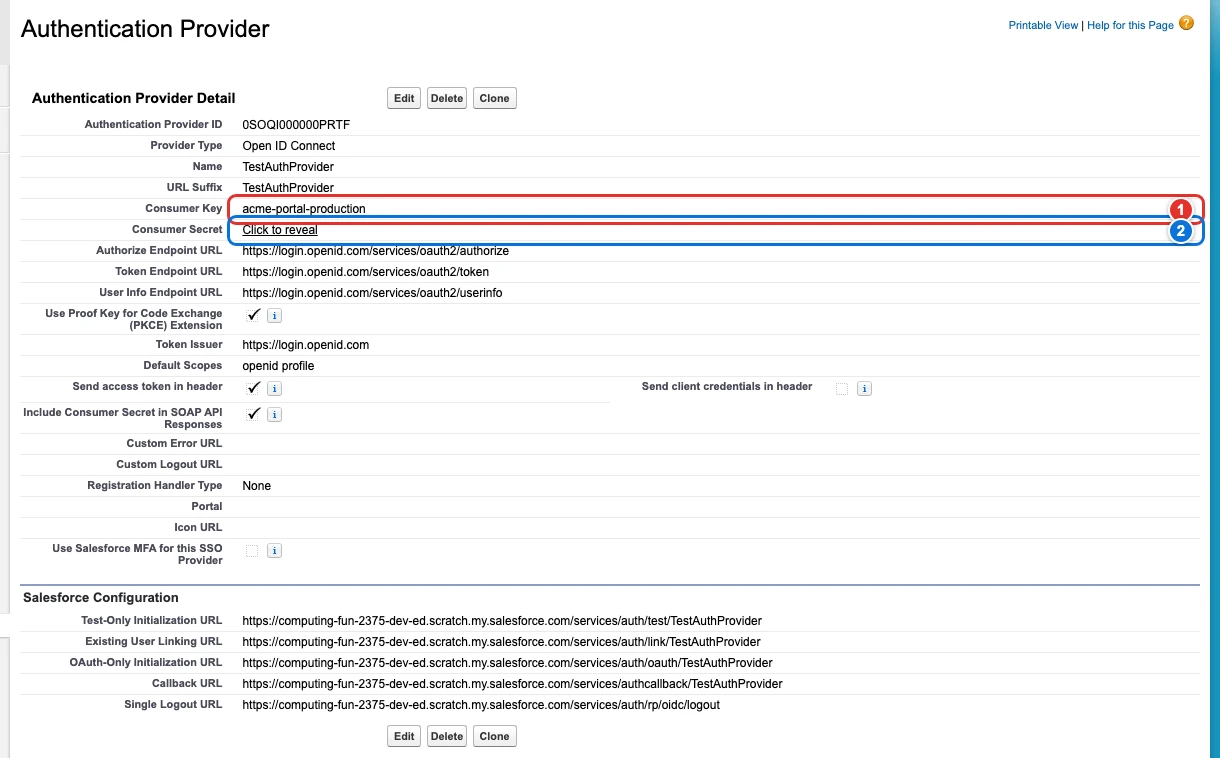",
"title": "Auth Providers",
"examples": [
{
"MyAuthProvider": {
"consumerKey": "my-consumer-key",
"consumerSecret": "${MY_AUTH_PROVIDER_SECRET}"
}
}
]
}